


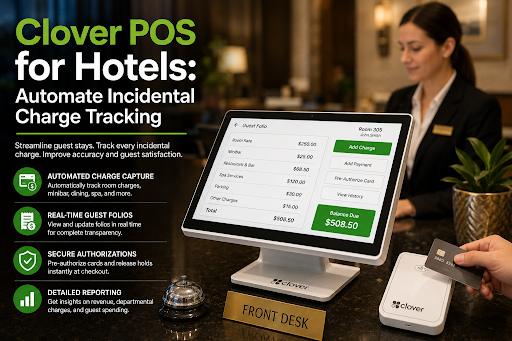
Clover POS for Hotels: Automate Incidental Charge Tracking
Incidental charges — minibar snacks, laundry, room service, damage fees — are where hotel bills quietly fall apart. A Clover POS system fixes this by posting every charge to the guest folio the moment it happens, instead of relying on handwritten slips and memory at checkout. The result: fewer disputed bills, faster front-desk lines, and recovered revenue that was leaking silently. In this guide, we break down exactly how automated incidental charge tracking works with a Clover POS, where manual systems fail, and what to verify before connecting Clover to your property management system (PMS). We call the method The Zero-Leak Loop — a simple three-step cycle (Capture → Post → Verify) that closes the gap between "guest consumed it" and "guest paid for it."
What counts as an incidental charge in a hotel?
Incidentals are everything a guest spends after booking the room. They're small individually, but they stack up fast — and they're the hardest charges to track manually.
The usual suspects:
- Minibar items — consumed at 11 p.m., forgotten by the 7 a.m. checkout rush
- Laundry and dry cleaning — picked up by housekeeping, logged on paper (or not at all)
- Room service — kitchen fires the order, but does the folio ever hear about it?
- Damage charges — broken lamp, stained carpet, missing towels
- Late checkout, parking, spa, resort fees
Incidentals typically make up 5–15% of a hotel's guest revenue, yet they account for the majority of billing disputes at checkout.
The problem isn't the charges themselves. It's the hand-offs. Every time a charge travels from housekeeping to the front desk on a slip of paper, there's a chance it never arrives.
Why do manual incidental charges cause billing errors?
Manual tracking fails in predictable ways — and most guides gloss over the ugliest one: staff simply skip logging small charges during busy shifts. A $4 water bottle isn't worth a walk to the front desk at 10 p.m. on a sold-out Saturday.
Here's where manual systems break:
| Failure Point | What Actually Happens | Cost to You |
|---|---|---|
| Paper minibar slips | Lost, illegible, or logged to the wrong room | Direct revenue loss |
| Checkout-time entry | Front desk rushes, guest disputes, charge gets waived | Waived revenue + slow lines |
| Late posting | Charge hits after guest pays → chargeback risk | Fees + bad reviews |
| Damage claims | No timestamp or photo evidence attached to the folio | Nearly impossible to collect |
Charges posted after checkout are 3–4× more likely to be disputed or charged back than charges posted while the guest is still on the property. That last row matters most. A damage charge with no evidence trail isn't a charge — it's an argument you'll lose.
How does a Clover POS system track incidental charges automatically?
A Clover POS turns every touchpoint — minibar cart, laundry station, restaurant, front desk — into a charge-capture point that posts straight to the guest folio through your PMS integration.
Here's The Zero-Leak Loop in practice:
- Capture: Staff taps the item on a Clover handheld or terminal at the point of consumption. Housekeeping scans minibar items in the room, not at a desk downstairs.
- Post: The charge routes to the correct room folio instantly via the hotel POS integration — no re-typing, no slips.
- Verify: At checkout, the front-desk billing system shows an itemized, timestamped folio. The guest sees exactly what they consumed and when.
Because Clover devices are portable and cloud-synced, the loop works anywhere on the property. Room service billing fires from the kitchen. Laundry billing automation happens at the laundry station. The front desk becomes a verification point, not a data-entry point.
When charges post at the point of consumption instead of at checkout, folio accuracy jumps because there is zero human re-entry between the transaction and the bill.
How much revenue do hotels lose to untracked incidentals?
This is the number most properties never measure — because you can't see revenue that was never logged.
Industry studies consistently estimate that incidental leakage accounts for 1–3% of total room revenue at properties using manual tracking. For a 100-room hotel averaging $150 per night at 70% occupancy, that's roughly $38,000–$115,000 per year walking out the door.
Where it leaks:
- Minibar shrinkage written off as "inventory variance."
- Room service orders that never reach the guest folio.
- Damage charges waived because there's no evidence trail to support them.
- Late checkout fees that go unbilled because the system required a manager override.
A mid-size hotel losing just 2% of room revenue to untracked incidentalscan forfeit more every year than the cost of the entire POS system that would have captured those charges automatically.
How does automated tracking handle disputes and damage charges?
This is the edge case most Clover POS articles skip entirely — and it's where automation earns its keep.
Disputes: An itemized folio with timestamps changes the conversation. "You were charged for two minibar waters at 11:42 p.m. on Tuesday." ends most disputes before they start. Vague line items like "MISC – $27" start them.
Damage charges (hotel damage charge tracking): The winning workflow is evidence-first.
- Housekeeping documents damage with photos on the spot.
- The charge is created in Clover with a note and timestamp, linked to the room folio.
- The guest is notified before checkout, not surprised by a post-departure charge.
- If it goes to a chargeback, you have a timestamped record tied to the stay.
Damage charges backed by same-day timestamped documentation are dramatically more likely to survive a chargeback than charges posted after the guest has left.
Pre-departure notification is the underrated step. Post-departure surprise charges are chargeback bait, no matter how legitimate they are.
What should you check before connecting Clover POS to your PMS?
Not every Clover-to-PMS integration is equal. Check these before you commit:
| Checklist Item | Why It Matters |
|---|---|
| Real-time folio posting (not batch sync) | Batch sync = charges missing at checkout |
| Room lookup on the Clover device | Staff must charge to a room, not just take payment |
| Split billing support | Corporate guests need room vs. incidentals separated |
| Offline mode behavior | What happens to charges when Wi-Fi drops in the basement laundry room? |
| Void/adjustment audit trail | You need to see who waived what — leakage isn't always accidental. |
A POS integration that syncs in batches instead of real time recreates the exact checkout gap that automation was supposed to eliminate.
Conclusion
Manual incidental tracking doesn't fail loudly — it leaks quietly. The Zero-Leak Loop (Capture → Post → Verify), powered by a Clover POS system, closes that leak by moving charge entry to the point of consumption and turning checkout into a verification step. The payoff is measurable: cleaner folios, fewer chargebacks, faster checkouts, and recovered revenue you didn't know you were losing.
Get Started With Us
Fill in your details and we'll get back to you shortly.