


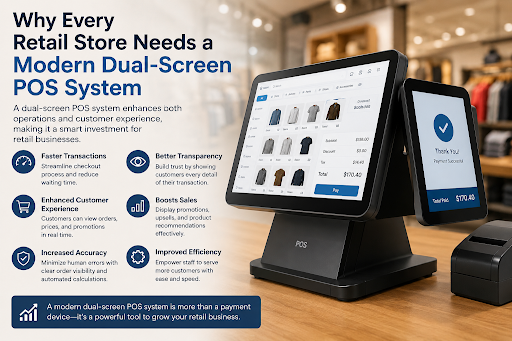
Why Every Retail Store Needs a Modern Dual-Screen POS System
So I was at a corner grocery store a few weeks back, and the cashier kept doing this thing where she'd spin the screen toward me, then spin it back toward herself, over and over, the whole time she was ringing up my order. Small thing. Annoying though, in a way you don't quite notice until you're standing there waiting on it. Turns out that's just what happens when a store's running old single-screen hardware instead of something like an A8700 dual-facing countertop, which honestly just gives both people their own screen instead of fighting over one.
Most stores that haven't upgraded yet don't even realize this is costing them anything. They just think that's how checkout works.
Get Started With Us
Fill in your details and we'll get back to you shortly.
Nobody Talks About the Single-Screen Problem, But It's There
Here's the thing. You're standing at a register, stuff's getting scanned, and you have zero idea what your total actually is until the very end when the cashier turns the screen around. By then? Too late to catch a wrong price or ask why something didn't ring up at the sale price.
That's the whole issue with a single screen. It either faces the cashier (customer's left guessing) or it faces the customer (cashier can't see their own tools properly anymore). For years, stores just lived with this. Not because it was fine, but because nothing better existed. Until it did.
What an A8700 Dual-Facing Countertop Actually Does Differently
Okay, so here's the actual change. A dual-facing A8700 countertop runs two full screens at the same time, not one screen trying to do two jobs badly. Cashier's side: inventory, pricing tools, loyalty lookups, whatever they need. Customer's side: a running total, item breakdown, updates live as things get scanned.
Doesn't sound like much written out like that. But put it on a Saturday afternoon with a line forming, and the difference is obvious. Fewer "wait, what was that price?" moments. Faster lines. And customers leave with this vague feeling that the store's just... better run, even if they couldn't explain why if you asked them.
Not All "Dual Screen" Setups Are Actually Dual Screen
I'll be honest, a lot of what gets sold as dual-screen is kind of a scam. One real screen, one tiny secondary display tacked on as an afterthought, usually laggy, sometimes showing stuff that's already a few seconds stale. Looks fine in a product photo. Falls apart the second an actual rush hits.
A real dual-screen POS system runs both displays independently and in sync, with no lag between them. That's the line between something that holds up under pressure and something that just looks good in marketing material. If you're comparing options, straight up ask the vendor whether the second screen runs its own interface or is just mirroring the first one. You'll learn a lot from how they answer that.
The Customer Screen Isn't Just Sitting There Showing a Number
People assume the customer-facing POS display is just... there. Passive. Shows a total, waits for a tap. It does more than that once a store actually uses it right.
Customers punch in their own loyalty number instead of saying it out loud to a stranger. They see a relevant promo based on what's already in the cart. Tip screens show up on their side, too, which, honestly, removes this weirdly awkward moment where a cashier has to ask someone to tip directly to their face. Nobody enjoys that exchange. Some setups even let people sign and approve digitally without reaching across the counter at all.
Cashiers Get Just As Much Out of This, Maybe More
Easy to frame this whole thing as a customer perk and forget what it does for the cashier POS system side. A dedicated screen means the cashier's not bouncing between their own tools and customer info crammed onto one cramped display anymore.
New employees learn it faster, too. Less confusion, fewer pricing slip-ups, transactions that just move instead of stalling every time something needs explaining mid-scan. Stack that across a full Saturday and the saved time is real, not theoretical.
Where This Fits Into the Bigger Retail Picture
Retail point-of-sale gear is used to get judged on exactly one thing: how fast it can scan a barcode. That's not really where the bar sits anymore. A modern retail point of sale setup gets judged on the whole interaction, start to finish, not just scanner speed.
Which is basically why smart retail POS systems with two screens keep showing up in smaller stores now, not just the big chains anymore. Owners are figuring out that customers remember how checkout felt way longer than they remember how fast it was. Nobody brags about a quick checkout to their friends. Plenty of people complain about a confusing one, though.
Touch and Interaction Are Quietly Just Expected Now
A few years back, an interactive customer display felt like something only massive chains bothered installing. That's shifted. Smaller stores are catching on that customers, especially the younger crowd, kind of expect to interact a bit at checkout, not just stand there watching numbers climb.
A touchscreen POS terminal on the customer's side lets them sign up for a loyalty program themselves, glance through an offer, and confirm their own order. Small shift in who's actually doing the work during checkout. And people respond to that better than you'd guess, even over something as minor as tapping a screen instead of just standing there nodding.
Picture This for a Second
Busy weekday, grocery store, full cart, line stretching back. On a single screen, the cashier ends up narrating every price drop and discount out loud while the customer half-listens, maybe checks their phone, and the line behind them just keeps growing.
Now picture the same exact scene with an A8700 dual-facing countertop running things instead. Cashier scans like always, sure, but the customer's watching their own screen the whole time and catches a double-scanned item before it's even worth bringing up. The line moves more quickly. Not because the scanner got faster. Because all that back-and-forth confusion just isn't part of the equation anymore.
There's a Trust Thing Going On Here Too
This part barely gets mentioned, but it matters. When someone watches their own total build in real time, something shifts in how much they trust what just happened. Pricing disputes, "that's not what I ordered" arguments, even casual theft accusations, all of it tends to drop once a customer's been watching the whole transaction unfold next to the cashier instead of finding out everything at the very end.
That kind of trust doesn't make headlines. But it's a big part of why someone comes back to the same store next week instead of just trying the place down the street.
Final Thoughts
None of this is really about chasing newer hardware just because it's newer. It's about closing a gap that's existed at checkout counters forever, the gap between what a cashier can see and what a customer's stuck guessing at. The A8700 dual-facing countertop closes that gap from both sides at once, which, honestly, not a lot of retail hardware manages to pull off.
If your store's still running a screen that gets flipped back and forth all shift, every shift, it's probably worth actually sitting down and adding up what that's costing in slower lines, pricing arguments, and small frustrations that quietly stack up over a year of people walking through your door.