


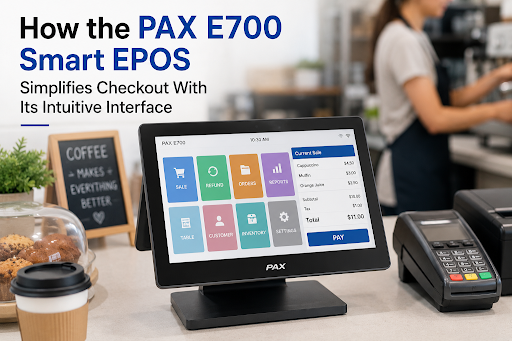
How the PAX E700 Smart EPOS Simplifies Checkout With Its Intuitive Interface
Anyone who's worked behind a busy till knows the feeling. A queue building up, a customer tapping their card twice because the screen froze for half a second, and a staff member quietly panicking because they can't find the discount button. The PAX E700 Smart EPOS was clearly built with that exact headache in mind. It's not flashy. It just works the way you'd hope a checkout system would, and that's honestly rarer than it should be.
I've looked at a fair few EPOS terminals over the years, and most of them try to cram in features nobody asked for while ignoring the basics — like, can a new employee actually figure this thing out on their first shift? With the PAX E700, the answer seems to be yes, and that alone explains why so many small shops and cafes are quietly making the switch.
Get Started With Us
Fill in your details and we'll get back to you shortly.
Why the Layout Just Makes Sense
There's something to be said for a screen that doesn't make you think too hard. The PAX E700 arranges its buttons and categories in a way that feels almost obvious — the stuff you use constantly sits right up front, not buried under three different menus like on some older systems. Big icons, clear labels, no guessing games.
This kind of intuitive POS interface matters more during a rush than during a quiet afternoon. Anyone can fumble through a slow Tuesday. It's the Saturday lunch crowd that exposes a bad design. And from what I've seen, this terminal holds up under that pressure better than most.
Running on Android Helps More Than You'd Think
Because it's built as an Android EPOS terminal, the whole thing feels less like specialized hardware and more like a tablet someone handed you. Swipe gestures, app-style menus, a home screen you can actually customize — staff who've never touched a POS system before still recognize the patterns from their own phones.
That familiarity cuts training time down noticeably. You're not teaching someone a brand-new language; you're teaching them where a few specific buttons live within a system they already half-understand.
An Easy-to-Use EPOS System Isn't Just a Nice-to-Have
People sometimes treat interface design like it's just decoration. It's not. A genuinely easy-to-use EPOS system has a direct effect on how fast a line moves and how many transactions get voided because someone hit the wrong thing.
Picture a small café at 1 pm. If the person on the till has to stop and hunt for a menu item three taps deep, that pause doesn't just affect one customer — it backs up everyone behind them. Do that a dozen times a shift, and you've lost real minutes, maybe real customers who decided the wait wasn't worth it.
A Touchscreen That Actually Keeps Up
A touchscreen retail POS is only as good as its responsiveness, and this is where a lot of cheaper terminals fall apart. Taps register late, or not at all, and the staff ends up tapping twice out of habit just to be safe. The PAX E700's screen doesn't really have that problem — it keeps up with fast fingers during a rush instead of lagging behind them.
The display also holds its own under harsh store lighting. No squinting, no tilting the screen to read a total. Small detail, but it adds up over a long shift.
Where the Speed Actually Comes From
Calling something a fast checkout POS system is easy to say and harder to prove. With the PAX E700, the speed comes less from raw processing power and more from how few steps it takes to do common things — applying a discount, splitting a bill, processing a return. On a lot of older systems, these tasks mean digging through settings or flagging down a manager. Here, they're usually a tap or two away.
For places with constant foot traffic — quick-service spots, convenience stores, busy retail counters — those saved seconds aren't trivial. They stack up across hundreds of transactions a day into noticeably shorter lines.
The Software Side Pulls Its Weight Too
Hardware is only half of this story. The terminal pairs with user-friendly POS software that handles inventory, sales reports, and staff permissions without needing someone with an IT background to set it up. Reports that used to eat up twenty minutes of a manager's afternoon now take a couple of taps. That's time given back to actually talking to customers instead of wrestling with spreadsheets.
It reflects a shift that's been happening across retail tech generally — systems designed around how people actually work the floor, not around what's convenient for the engineers who built them.
What Sets the PAX E700 POS System Apart
Here's the thing about the PAX E700 POS system — there isn't one single jaw-dropping feature that explains its popularity. It's more than a handful of smaller things that line up well together. Quick boot times mean less dead time at opening. Stable connectivity means fewer failed card payments. A compact footprint means it doesn't eat up counter space that's already tight in a lot of small shops.
None of that sounds revolutionary on its own. Put together, though, it creates a checkout experience that mostly just disappears into the background, which honestly might be the highest compliment you can give a piece of retail hardware.
Who This Setup Actually Suits
Small to mid-sized retailers, cafes, salons, quick-service restaurants — these are the businesses that feel the benefit most, mainly because they run lean and can't afford a week-long onboarding process every time someone new joins. A till that staff can pick up fast means smoother shifts, especially when hiring spikes during busy seasons.
Multi-location businesses get something extra out of it, too. Once one branch's team learns the system, training the next location barely takes any extra effort, since the experience doesn't shift from store to store.
Final Thoughts
Checkout systems rarely get talked about, but they shape a customer's impression of a business more than people realize. A confusing till makes staff hesitant and queues longer. A good one just fades into the background, letting actual service take center stage. That's the real strength behind the PAX E700 Smart EPOS — not a long feature list, but a checkout experience that gets out of everyone's way.
If you're weighing a POS upgrade, skip the spec sheet contest for a minute and ask the simpler question: can your team actually use this well on day one? Judging by how this terminal handles a normal day's pressure, it's easy to see why so many businesses are deciding the switch is worth it.