


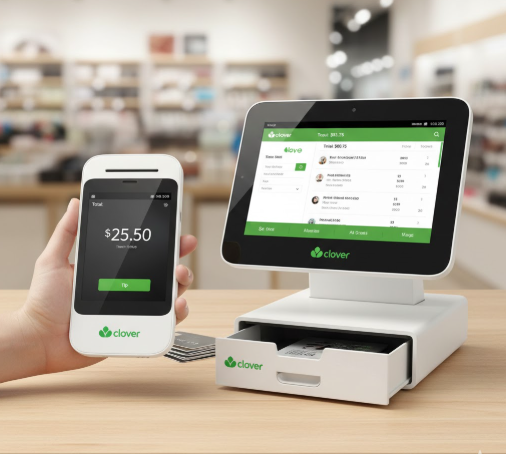
Is Clover Flex better than Clover Mini POS?
If you are shopping for an online Clover Flex POS machine, you're probably trying to answer one thing: Will Flex actually fit my daily workflow better than Mini, or am I paying for "portable" when I don't need it?
But if you are comparing options for Clover Flex POS devices, then this can be looked at as a smart concern, because the wrong POS choice usually shows up later as slow checkouts, staff confusion, and awkward workarounds.
For most businesses, the decision becomes easy once you map your real-life checkout flow. If payments happen at a fixed counter, Mini tends to feel clean and steady.
If payments need to move with staff, Flex tends to feel faster and more flexible, especially in busy hours. This guide breaks it down in a buyer-friendly way so you can choose confidently.
Get Started With Us
Fill in your details and we'll get back to you shortly.
Why Do Clover Flex POS Devices Get Compared to the Clover Mini So Often?
Both are popular "small footprint" options in the Clover ecosystem, but they are built for two different styles of selling.
One is designed to move around, the other is designed to stay anchored. If you buy based on looks or price alone, you will miss the most important factor: where the transaction happens.
What is the Biggest Difference Between Clover Flex and Mini in Daily Operations?
The difference shows up in these moments when:
Customer Flow
If lines are common, mobile checkout can reduce wait time. If checkout is naturally counter-based, a station keeps things organized.
Staff Training
Station-based workflows are easier for teams who "work the register." Mobile workflows are easier for teams who already move around.
Business Growth
If you expect growth, consider how easy it will be to add devices later (many businesses eventually run both: a counter station and a mobile POS unit, such as A77 Smart POS).
This comparison would be essential for a portable POS vs countertop POS decision.
When is Clover Flex the Better Choice?
It is usually the best fit when mobility directly improves speed and customer experience. Some scenarios are listed below:
- Restaurants: tableside payments reduce back-and-forth and help close checks faster.
- Retail store during peak times: staff can take payments away from the main register to reduce lines.
- Pop-ups/markets/curbside: if you don't have a consistent counter, handheld checkout is simply more practical.
If your business has multiple "payment moments" (counter, floor, curbside), Flex can help you keep service smooth without forcing customers to wait at one spot.
When Does Clover Mini Win Instead?
Mini is usually the better option when customers need fast check-out, and you want a simple, stable setup that staff can learn quickly.
Mini typically wins for:
- Small retail counters where there is a little space, but you still want a solid checkout station.
- Quick-service counters where order and payment go on in just one click.
- Service desks (salons, clinics, repair shops) where customers walk up to pay.
If your team spends hours working in the register, a fixed station often feels more consistent, less juggling, fewer "where do I place this?" moments, and a cleaner flow for repeatable operations.
Clover Flex vs Clover Mini: Which is Easier for a Small Business?
Here is what we see most often: the "easiest" device is the one that matches how the staff already works.
If staff move to serve customers, Flex feels natural because checkout can happen wherever service happens.
If staff stay stationed at a counter, Mini feels natural because the process stays consistent and predictable.
That's why the best Clover POS for small businesses is not the most popular device; it is the one that removes friction from your daily workflow.
What Should You Check Before Choosing?
Use this practical checklist (it prevents most buyer regret):
- Where do payments happen most? At the customer (Flex) or at a counter (Mini)?
- Do you need to reduce lines? If yes, a mobile device can help during peak hours.
- How many staff members will use it daily? More users = you'll value a consistent flow and simpler training.
- Will you expand later (extra devices, extra locations)? If growth is likely, consider a setup that won't force you to replace hardware soon.
Clover Hardware Pricing Comparison
Many people focus on hardware price, but the smarter budgeting gives another level of satisfaction:
- Hardware cost: upfront or financed (depends on the offer you choose).
- Plan/software: your plan influences features and long-term spend.
- Add-ons/apps: optional tools can increase the monthly cost depending on your needs.
This is why Clover POS monthly fees matter to your plan, and add-ons can shape the long-term cost more than the device itself.
Make sure to check the Clover Flex vs Mini cost before buying.
Clover Flex Vs Mini Features: Quick Buyer Recommendation
Pick Flex if you:
- want payments to happen anywhere (tableside, etc.)
- need flexibility during rush hours (restaurants, stores, etc.)
- operate in a space where customers are not always near the counter
Pick Mini if you:
- want a stable, counter-first checkout experience
- have limited counter space but want a dedicated station
- prefer a predictable routine that's easy to train and repeat
By making a choice, check the review of Clover Flex and Mini.
Feature Summary:
| Feature | Clover Flex | Clover Mini |
|---|---|---|
| Portability | Handheld | Countertop |
| Best For | Tableside | Fixed Counter |
| Setup | Mobile | Stationary |
Conclusion
Clover Flex is used to make checkout hassle-free and also improve customer experience. Clover Mini looks better when business runs on a counter-first flow, and you want a compact, dependable station.
The right choice is the one that makes selling easier for staff and smoother for customers every single day.
If you tell us your business type (retail, restaurant, service) and how customers typically pay, we can recommend the most practical setup so you don't overspend or end up with the wrong workflow.