





Find the right setup for your store
You are here
Convenience store
Neighborhood and corner stores with a large mix of drinks, snacks, tobacco, and everyday items.
Have fuel pumps?
Gas station store
Everything here, plus working alongside your fuel system and reconciling pumps and store at shift close.
Gas station POSMostly groceries?
Grocery or market
Larger stores with produce, weighed items, and bigger baskets at checkout.
Grocery POSSelling beer, wine, and spirits as your main business? See our liquor, vape, and smoke shop POS.
Where convenience stores quietly lose money
Short deliveries nobody catches
A driver drops 22 cases and the invoice says 24. If nobody checks before the truck leaves, you pay for product you never got.
Shelf and register prices drift apart
Vendors raise costs, you update the shelf tag, and the register still rings the old price. Every sale leaks margin.
Drawers that never quite balance
A few dollars short every night across three shifts adds up. Without cashier-level counts, you cannot tell where it happens.
Deals applied by memory
A 2 for $5 promotion that depends on the cashier remembering it means some customers get it, some do not, and nobody knows what it cost.
What your convenience store POS should do
Large price book, bulk changes
Thousands of items, with prices updated by category, vendor, or brand in one step.
Delivery check-in
Scan vendor deliveries at the back door and compare them with the invoice before the driver leaves.
Mix-and-match deals
2 for $5, combo discounts, and case versus single pricing applied automatically.
Forced ID checks
Tobacco, vape, beer, and wine trigger an age check cashiers cannot skip. Tobacco is 21 and over nationwide.
EBT for eligible items
SNAP-eligible food flagged in the price book, with tobacco, alcohol, and hot food kept separate.
Blind drawer counts
Cashiers count without seeing the expected total, and overs and shorts are logged by shift.
Shelf label printing
Print new shelf tags straight from a price change so the shelf and register always match.
Sales and margin by category
See which departments bring traffic and which bring profit, and adjust your mix.
Catch short deliveries before the truck leaves
Much of a convenience store’s stock arrives straight from vendors: soda, snacks, bread, beer, and ice. Those deliveries are fast and easy to get wrong.
Scanning a delivery into the POS as it comes in compares what arrived with the invoice. Missing cases, wrong items, and changed costs show up while the driver is still there to fix them, and your inventory counts update in the same step.
Sample report
Delivery check-in, beverage vendor
- Cola 12-pack2422
- Lemon-lime 12-pack1212
- Sparkling water1010
Variance
Short 2 cases
Credit due
$31.98
Blind counts: find out where the drawer goes short
At shift change, the cashier counts the drawer without seeing what the POS expects. The system compares the two after the count is entered.
Because the target is hidden, nobody can adjust the count to match. Over a few weeks, the overs and shorts by cashier and shift show whether a gap is a one-off mistake or a pattern worth a conversation.
Sample report
Blind count results, one week
Morning shift
7 of 7 balancedEvening shift
Short 2 days, $8Overnight shift
Short 5 days, $64
Small tickets, big fee share
A $4 drink on a card still carries a processing fee, and on thin c-store margins that fee is a real share of the profit. A cash discount program lets card customers cover the cost of card acceptance.
Recommended setups

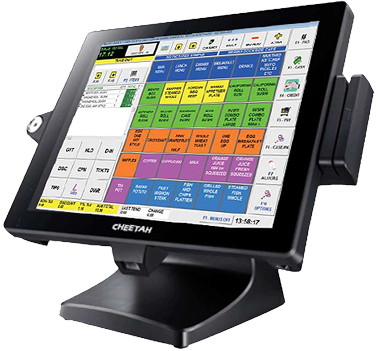
Corner store
One register
- Countertop POS with barcode scanner
- Receipt printer and cash drawer
- Card terminal with EMV and contactless
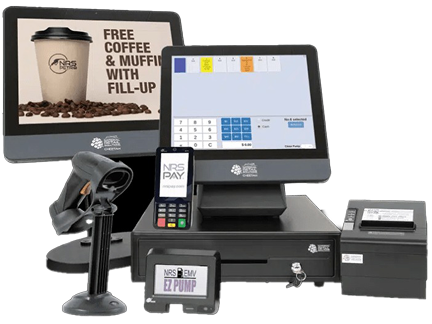
Busy convenience store
Two or more registers
- Registers on one shared price book
- Handheld scanner for deliveries and counts
- Shelf label printer
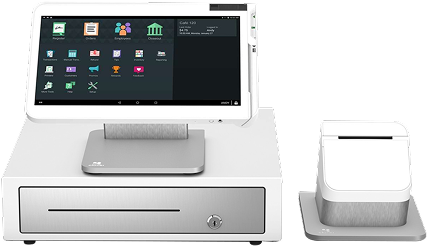
Multi-store owner
Two or more locations
- Same setup and price book at every store
- Price changes pushed to all locations
- Reports across stores from one login
Questions to ask before you buy a c-store POS
Ask any provider these, including us.
- Can you import my current price book, or do I rebuild it by hand?
- Can I change prices for a whole vendor or category at once?
- Can I scan in vendor deliveries and see shorts right away?
- Are 2 for $5 and combo deals applied automatically?
- Is the ID prompt forced on tobacco and alcohol?
- Does it support blind drawer counts by cashier?
- What is the full monthly cost, including hardware, software, and processing?
- Can I get phone support during the overnight shift?
From quote to first sale
Tell us about your store
Registers, locations, current POS, and roughly how many items you carry.
Price book import
We import your items and flag age-restricted and EBT-eligible products.
Setup and training
Hardware ships configured, and we walk cashiers through checkout, ID checks, and blind counts.
First shift close
We help you run your first close and delivery check-in.
Convenience store POS questions, answered
A convenience store POS should handle thousands of items with bulk price changes, check in vendor deliveries by scanning, run mix-and-match deals, force ID checks on age-restricted items, accept EBT for eligible items, and report sales and margin by category. NRS is a strong fit for most independent stores, and Clover works well for stores that want more apps and handheld options.
Most convenience stores carry a few thousand items, and the systems we set up handle that comfortably. We import your existing price book or build one from your invoices, and flag age-restricted and EBT-eligible items during setup.
Many convenience store products arrive directly from vendors such as soda, snack and beer distributors. Checking in a delivery means scanning what actually arrived and comparing it with the invoice before the driver leaves, so short deliveries and wrong prices are caught on the spot.
Yes. Mix-and-match pricing applies deals such as 2 for $5 on energy drinks or a discount on a snack and drink combo automatically at checkout, so cashiers do not have to remember or apply them by hand.
In a blind count, the cashier counts the drawer at shift end without seeing how much the POS expects. The system then compares the two. Because the cashier cannot see the target, the count is honest, and overs and shorts are recorded by cashier and shift.
Yes, for eligible food items, once your store is authorized by the USDA to accept SNAP. Tobacco, alcohol, hot prepared foods and non-food items are not eligible, and the POS keeps them separate at checkout.
Most stores are live within 24 to 48 hours. Very large price books may take a little longer to import and check.
Run a tighter store,
every shift
Tell us about your store and we will recommend a setup, with the full monthly cost upfront.
Sales: (214) 831-4739
Support: (469) 986-0036
Email: sales@soireeinc.com
8539 Rugby Dr, Irving, TX 75063
Get a convenience store quote