





What we run, and what stays on your fuel system
Most gas stations run two systems: one for the pumps and one for the store. Knowing the line between them saves you from buying the wrong thing.
Soireeinc handles
The store inside
- Counter checkout, barcode scanning, and the price book
- Age verification for tobacco, vape, beer, and wine
- EBT for eligible grocery items
- Cash drops, voids, and shift reports
- Card processing for in-store sales
Your fuel system handles
The forecourt
- Pump authorization and fuel dispensing
- Pay-at-the-pump card readers
- Fuel price signs and cash/credit fuel pricing
- Tank monitoring and fuel reporting
Common fuel systems include Gilbarco Passport and Verifone Commander.
At shift close, you read fuel totals from your fuel system and store totals from ours. We help you set up a close routine so both balance.
Where gas station stores lose money
Skipped ID checks
One sale of tobacco or alcohol to a minor can mean fines and permit trouble. Busy cashiers skip steps when the POS does not force them.
Cash that goes missing
Unlogged voids, no-sale drawer openings, and late cash drops are where shrink hides on overnight shifts.
Price book drift
Cigarette and beverage prices change often. Updating hundreds of items one at a time means shelf and register prices stop matching.
Morning rush lines
Coffee, energy drinks, and snacks between 6 and 9 AM. A slow scanner or card reader sends commuters to the station across the street.
What your gas station POS should do
Forced ID prompts
Tobacco, vape, beer, and wine trigger an age check that cashiers cannot skip. Federal law sets the tobacco age at 21 nationwide.
Large price book, bulk updates
Thousands of items, with price changes applied by category or vendor in one step.
Cash drops and drawer alerts
Prompts to drop cash when the drawer gets heavy, logged by cashier and time.
Void and no-sale tracking
Every void, refund, and drawer opening recorded by employee, visible in reports.
EBT for eligible items
SNAP-eligible groceries flagged in your inventory, with fuel, tobacco, alcohol, and hot food kept separate.
Lottery as its own department
Record lottery sales and payouts separately so they reconcile against your lottery terminal.
Shift and end-of-day reports
Sales by department, by cashier, and by hour, ready for the next shift to count in.
Remote view for owners
Check sales, voids, and cash drops from your phone without driving to the station.
Recommended setups
The right mix depends on registers, store size, and how many locations you run.

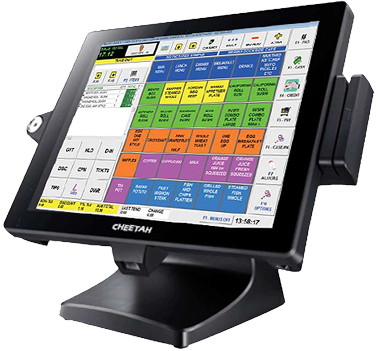
Single-register kiosk
Small store, fuel-first station
- One countertop POS with scanner
- Receipt printer and cash drawer
- Card terminal with EMV and contactless
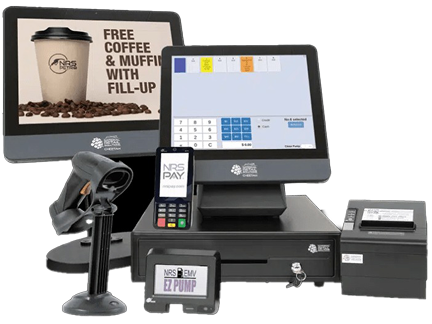
Full convenience store
Two or more registers
- Multiple registers on one shared price book
- Customer-facing display
- Label printing for shelf prices
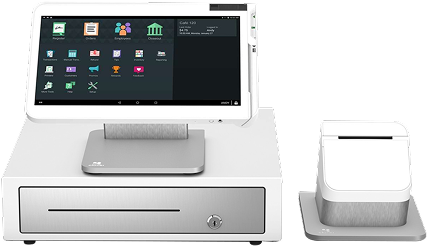
Multi-station owner
Two or more locations
- Same setup at every location
- Sales and shrink reports across stores
- Central price updates
Your customers already know cash and card prices
Drivers see separate cash and credit prices on the sign out front. Bringing the same idea inside the store with a cash discount program lets card customers cover the cost of card acceptance, so fees stop eating into thin in-store margins.
Questions to ask before you buy a gas station POS
Ask any provider these, including us.
Running a convenience store without fuel? Most of this still applies. See our grocery POS for high-SKU stores.
- Does the POS control my pumps, or does it run beside my fuel system?
- Can cashiers skip the ID prompt, or is it forced?
- Can I change prices for a whole category or vendor at once?
- Are voids and no-sale drawer openings tracked by employee?
- Does it support EBT and keep ineligible items out automatically?
- Can I see sales and cash drops from my phone?
- What is the full monthly cost for hardware, software, and processing?
- Is phone support available at 2 AM, when my overnight shift needs it?
Getting your station set up
Tell us about your station
Registers, store size, fuel system brand, and current POS.
Price book import
We import your items and prices and flag age-restricted and EBT items.
Setup and training
Hardware ships configured, and we walk your cashiers through checkout, ID prompts, and cash drops.
First shift close
We help you run your first close so store and fuel totals balance from day one.
Gas station POS questions, answered
No. Our POS runs the store inside your gas station. Pump control, pay-at-the-pump terminals and fuel price signs stay on your existing fuel system, such as Gilbarco or Verifone. The two systems work side by side, and we help you reconcile both at shift close.
For the store inside, look for fast barcode checkout, a large price book with bulk price changes, age verification for tobacco and alcohol, EBT acceptance, cash drop tracking and shift reports. NRS is a strong fit for most single-store and small multi-store stations.
Yes. Age-restricted items trigger an ID prompt at checkout. Federal law sets the minimum age for tobacco and vape products at 21, and states set their own rules for alcohol, so a consistent prompt helps cashiers avoid costly mistakes.
Yes, for eligible food items, once your store is authorized by the USDA to accept SNAP. Fuel, tobacco, alcohol and hot prepared foods are not SNAP eligible, and the POS keeps those items separate at checkout.
Yes. Gas station customers already expect different cash and card prices at the pump, which makes a cash discount program inside the store an easy fit. We set up compliant signage and receipts after reviewing your state's rules.
Most stations are live within 24 to 48 hours. Larger price books with thousands of items may take a little longer to import and check.
Get the store inside your station under control
Tell us about your station and we will recommend a setup, with the full monthly cost upfront.
Sales: (214) 831-4739
Support: (469) 986-0036
Email: sales@soireeinc.com
8539 Rugby Dr, Irving, TX 75063
Get a gas station quote