





Where nail salons lose time and money
Tip disputes
A single card tip on a two-technician service turns into a conversation at closing. Staff trust drops when tips feel guessed.
Walk-in chaos
Appointments live in one book and walk-ins in someone’s head. Clients wait while a free technician sits idle.
Payday spreadsheets
Commission and tips get rebuilt by hand every week, which costs hours and invites mistakes.
What a nail salon POS needs to do
Everything below is configured during onboarding, so your team starts with your menu, your technicians, and your tip rules already loaded.
Walk-ins and appointments together
See who is booked, who is waiting, and which technician is free from the front desk.
Tips by technician
Assign each service to the technician who did it, so card tips land with the right person, even on shared clients.
Commission and payout reports
Sales, services, and tips per technician for any date range, ready for payroll.
Service menu with add-ons
Gel, dip, acrylic fills, removal, nail art, and upgrades as one-tap buttons with set prices.
Chairside payments
Handheld terminals let clients tap or insert a card at the station, so wet nails stay untouched.
Gift cards and packages
Sell and redeem gift cards and prepaid service packages, which bring clients back in slower months.
Retail inventory
Track polish, cuticle oil, and take-home products alongside services.
Client history
Past services, preferred technician, and favorite colors saved to the client profile.
Recommended setups by salon size
Most salons need one terminal at the front and handhelds on the floor. The exact mix depends on stations and staff.


Small salon
1 to 4 stations
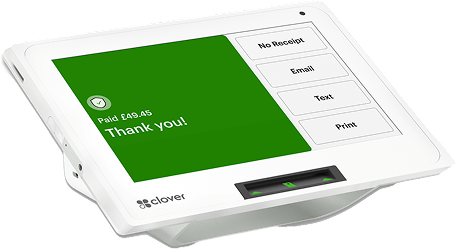
One handheld terminal that works at the desk and at the station, with receipt printing and a cash drawer as needed.
- Stations: 1 to 4
- Terminal: One handheld at the desk and the station
- Add-ons: Receipt printing and cash drawer as needed
Growing salon
5 to 10 stations
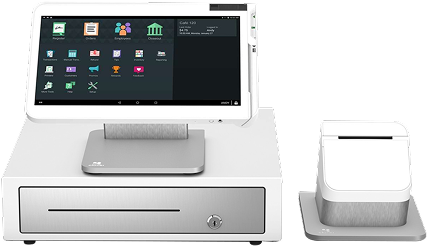
A countertop terminal at the front desk, one or two handhelds for chairside payment, plus appointment and staff management.
- Front desk: Countertop terminal
- Floor: One or two handhelds for chairside payment
- Management: Appointments and staff
Busy or multi-location salon
10+ stations or more than one location
A full front desk station with a customer-facing display, handhelds across the floor, and reporting across locations from one dashboard.
- Front desk: Station with customer-facing display
- Floor: Handhelds across the floor
- Reporting: All locations from one dashboard
Many of your clients pay cash. Use that.
Nail salons often take a large share of payments in cash. A cash discount program lets card clients cover the cost of card acceptance while cash clients get a discount, so processing fees stop eating into service margins.
Questions to ask any nail salon POS provider
Whoever you choose, get clear answers to these before you sign.
Running a full-service hair salon or spa as well? See our salon and spa POS system.
- Can one ticket carry services from two technicians, with tips split between them?
- Can walk-ins and appointments be managed on the same screen?
- Can I pull tips and sales per technician for any pay period?
- Can clients pay at the station, not only at the desk?
- Is a cash discount or dual pricing program supported?
- What is the total monthly cost, including hardware, software, and processing?
- Is support available by phone outside business hours?
Get set up in four steps
From onboarding to your first appointment, we make it simple. Here's how it works:
Tell us about your salon
Share your salon details, services you offer, and your business goals. It only takes a few minutes.
Get your setup
We’ll set up your account, add your team, and customize your schedule, services, and pricing to match your business.
Invite your team
Add your technicians, set their availability, and give them access to the tools they need.
Open for business
Start accepting appointments, manage your day, and let your clients book with ease.
Frequently asked questions
The best nail salon POS handles walk-ins and appointments together, splits tips by technician, tracks commissions, and lets you take payment at the chair. For most salons that means a countertop terminal at the front desk plus one or more handheld terminals, such as a Clover setup or a PAX handheld.
Yes. Services are assigned to the technician who performed them, and card tips are attributed to that technician, including when two technicians work on one client. Tip totals per technician appear in end-of-day reports.
Yes. Appointments and walk-ins can be managed from the same system, so the front desk can see who is booked, who is waiting, and which technician is free. We set this up around how your salon already runs.
Yes. Sales reports by employee show services performed and tips earned per technician, which you can use to calculate commission or payroll without rebuilding it in a spreadsheet.
Yes. Handheld terminals such as the Clover Flex or PAX A920 let technicians take card, chip, and contactless payments at the station, so clients with wet nails do not have to handle a wallet at the front desk.
Yes. Nail salons often take a large share of payments in cash, which makes a cash discount program a strong fit. We configure the terminal, signage and receipts for a compliant program.
Most salons are live within 24 to 48 hours. We load your service menu, add your technicians, and configure tips before you go live.
Get a POS that fits how your salon runs
Tell us about your stations and staff. We will recommend a setup and show the full monthly cost upfront.
Get a nail salon quote