


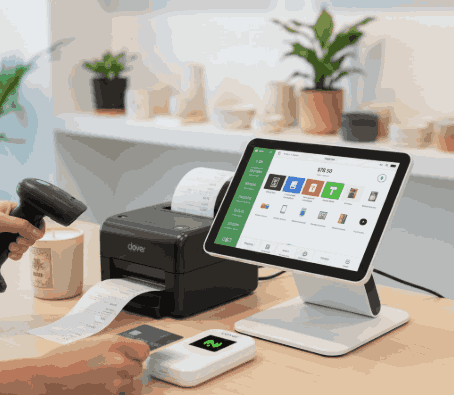
What are POS Devices and How Do They Work?
Point-of-sale devices, also known as POS, are all-in-one solutions that streamline and manage sales and inventory for business owners. This is an innovative technology curated to digitalize business operations and streamline them for efficient management. It handles:
- Sales
- Inventory
- Customer Payment
As a business owner, it is important for you to understand how immersive POS setups work. By a thorough understanding of these modern systems, you can choose the right type of system for your business.
Get Started With Us
Fill in your details and we'll get back to you shortly.
Understanding POS Devices
POS devices are electronic tools that help businesses to:
- Process Sales Transactions
- Accept Payments
- Manage Operational Data
Such systems/tools act as the bridge between customers and businesses during checkout. Their job is to act as efficient, trained partners who are fast and accurate at the same time. Such point-of-sale devices do more than payment acceptance. They:
- Record Sales Data
- Update Inventory
- Generate Reports
- Support Multiple Payment Methods
Core POS System Hardware Components
POS systems can't be a valuable asset to a business owner unless the software is hosted on compatible, fast POS hardware. These elements merge well together to offer:
- Accuracy
- Faster Transactions
- Security
POS Terminal
The POS terminal is basically the central control unit of the POS system hardware. This is the main component where sales are processed, and data is managed. It makes sure that the objectives are performed with accuracy and speed.
Card Reader Machine
A card reader machine is the main component responsible for transaction processing and payment-related tasks. It enables the customers to pay using different formats, including:
- Debit Cards
- Credit Cards
- Contactless Payment
Barcode Scanner Device
The barcode scanner device used to be an optimal feature to offer accessible payments and connectivity. However, with the current digitalization and surge in accessible online payment system such hardware come preinstalled in the system to speed up checkouts. The scanner can easily retrieve product information without the need for further assistance.
Receipt Printer
A receipt printer is a core component of a standard POS machine that provides a detailed retail receipt with a glossary of the items ordered. Mainly, one copy is stored in the system, while the other copy is for the user to take home. This component helps customers with transaction records and supports returns or exchanges when valid.
Cash Drawer
Cash drawer is another core element that has evolved from the initial POS systems to the modern ones. This component deals with careful cashing. It securely stores physical currency and opens automatically after a sale for quick transactions.
This feature is the most familiar system component as it has been attached to the OG POS system from the earliest of time and offers a sense of familiarity for older brick and mortar businesses trying to go digital.
Together, these payment processing devices help business owners offer smooth checkout experiences with fast, secure transactions.
How POS Devices Work Step by Step?
Are you a business owner wanting to speed up operations with a POS system, or just want to upgrade your old one but don't know how to make an informed decision? Then this might help. A better understanding of POS transaction processing can help you navigate the right POS that matches your business domain and operations.
- The POS System processes products by either scanning or manual entry.
- The system then calculates and crunches the numbers for you. This includes totals and applicable taxes.
- The POS System then accepts payments via predetermined acceptable formats. This includes cash, card, or digital wallet.
- Once the transaction is done on the external level, the POS begins the internal process, which includes processing and storing all the transactional data.
- Inventory levels update automatically with the system.
This seamless POS device functionality helps you and your staff to serve customers quickly and maintain accurate records.
POS System Components Explained
The ecosystem is a blend of many POS system components that go beyond hardware to process, store, and manage inventory and other transactions done by a high-tech POS system.
- Intuitive software responsible for sales tracking and reporting
- Payment gateways responsible for secure transactions
- Inventory and customer management tools for faster and simpler transactions.
These components are especially valuable for retail POS devices, where real-time data directly impacts the operations and profit of the business.
POS Devices for Different Business Sizes
One POS system can't match all types of business. So, experts suggest finding and finalizing the right solution based solely on your business's scale and needs. Since most full-fledged POS systems match the business model of bigger enterprises, here are some of the suitable POS models ideal for smaller businesses.
POS Devices for Small Businesses
Why bother with bigger and bulkier system with over complicated features that don't match your small business operations. Ideally, small business owners prefer compact and affordable POS devices for small businesses that don't hog up the counter and can help them and their staff manage sales without complex infrastructure.
Mobile POS Devices
Mobile POS devices are portable and easy to use due to the familiar Android based infrastructure. This saves owners time as these devices don't require a detailed training session for the staff. Such devices accept payments anywhere from the sales floor to events.
Cloud POS Devices
With cloud POS devices, business owners can easily store data online. This feature can help manage your business more efficiently via:
- Remote Access
- Automatic Updates
- Real-Time Analytics
POS Device Setup and Connectivity
Similar to any other kind of setup and machinery, the POS service setup needs to be set up properly for it to work efficiently.
A proper POS device setup will help you operate smoothly with streamlined day-to-day tasks. This includes installing:
- Software
- Connecting Hardware
- Configuring Payment Method
The next most important thing to set up is getting reliable POS device connectivity, which is necessary for uninterrupted transactions via:
- Wi-Fi
- Ethernet
- Cellular Networks
Businesses also tend to use POS device integration to sync their systems with others:
- Accounting Software
- eCommerce Platforms
- Inventory Tools.
This is where many easy to setup and compact POS devices and setups, such as Clover POS is gaining popularity. Credible brands like Soireeinc offer a wide range of such products, so look into it for a quicker selection process.