


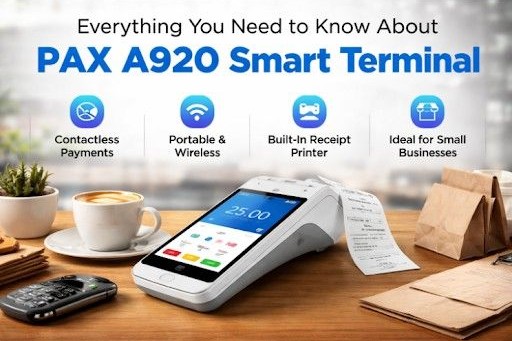
Smart Terminal: Features, Setup, and Pricing (2026)
PAX A920 revolutionizes how businesses accept payments with its all-in-one smart payment system. Modern customers expect fast, secure, and flexible payment solutions.
Cash alone no longer meets demand. Businesses now need a device that handles card, contactless payments, and digital wallets without delay. This is where smart terminals step in.
In this guide, you will understand how this device works, what makes it different, and whether it fits your business needs.
Get Started With Us
Fill in your details and we'll get back to you shortly.
What is a PAX A920 POS Terminal?
A PAX A920 POS works as a portable payment device that combines hardware and software into one system.
Unlike traditional machines, this device runs on an Android POS terminal system. That means you can install apps, manage transactions, and track sales from one screen. It acts more like a smartphone than a basic payment machine.
Businesses use it for:
- Card Payments
- Contactless Payments
- Digital Wallets
- QR Code Payments
- Inventory Tracking
- Sales Reporting
- Receipt Management
This flexibility makes it a strong choice for modern payment environments.
Standout Features You Should Know
The PAX A920 features focus on speed, flexibility, and user experience.
Touchscreen Interface
The device includes a responsive touchscreen that feels similar to a smartphone. Staff can navigate menus quickly without long training sessions.
Wireless Connectivity
As a wireless POS terminal A920, it supports WiFi, Bluetooth, and 4G connectivity. This allows payments from anywhere, not just at a counter.
Built-in Printer
You can print receipts directly from the device. No need for extra hardware or cables.
Secure Transactions
It supports advanced security standards, which protect both businesses and customers during transactions.
App Integration
The system allows the installation of business apps. You can track sales, manage inventory, and review reports from one device.
These features turn it into more than just a payment tool.
Real-World Scenario: How Businesses Use It?
A cafe owner struggled with long queues during peak hours due to the small shop. Customers waited too long because the staff had to move between the counter and the tables.
After switching to the PAX A920 device, staff took orders and payments directly at the table. This reduced waiting time and improved customer experience.
Sales increased because:
- Customers paid faster
- Staff handled more orders
- Service felt more professional
This example shows how the right device can improve both efficiency and revenue.
PAX A920 Specifications You Should Know
The PAX A920 specifications explain its performance and reliability.
- Operating System: Android-based
- Display: 5-inch touchscreen
- Connectivity: Wi-Fi, Bluetooth, 4G
- Battery: long-lasting rechargeable battery
- Printer: Integrated thermal printer
- Camera: Built-in for scanning QR codes
- Payment Methods: EMV/NFC (contactless), Magstripe
- Security: Encrypted and secure payment processing
- Mobility: Portable handheld device for on-the-go payments
These specifications support smooth operation in fast-paced environments.
How This Smart POS Terminal Improves Business Operations?
A POS terminal does more than accept payments. It improves how a business operates daily.
Fast Checkout
Staff complete transactions quickly, which reduces customer wait time.
Mobility
As a handheld POS device, it allows payments anywhere. Restaurants, delivery services, and retail stores benefit from this flexibility.
Data Access
Business owners can track sales and performance without separate systems. They access data through PAX easily and use it in an efficient way without wasting time.
Customer Experience
Quick and easy payments create a better impression and encourage repeat business.
These improvements directly impact growth.
Contactless Payments and Modern Transactions
Customers now prefer tap-and-go payments. A contactless POS machine supports this demand without delay.
This device also works as an NFC-payment terminal A920, which means it can accept:
- Contactless cards
- Mobile Wallets
- Smartwatch Payments
This reduces transaction time and keeps the process simple for customers.
Set Up Process Made Simple
The PAX A920 setup process does not require technical expertise.
Step 1: Power On
Turn the device on and follow the instructions on the screen that appear initially.
Step 2: Connect Network
Choose Wi-Fi or mobile data and connect to the internet.
Step 3: Install Required Apps
Download payment and business apps based on your needs.
Step 4: Configure Payment Settings
Set up your payment gateway and preferences.
Step 5: Test Transaction
Run a test payment to confirm everything works properly.
This simple process allows businesses to start quickly without delays.
PAX A920 Pro vs A920: What's the Difference?
A comparison of the PAX A920 Pro vs A920 helps buyers make the right choice.
Standard Version
- Suitable for small to medium businesses
- Balanced performance
- Lower cost
Pro Version
- Faster processing
- Better performance under heavy usage
- Designed for high-volume businesses
If your business handles many transactions daily, the Pro version offers better performance.
Pricing Overview in the USA
The PAX A920 price in the USA varies based on configuration, features, and provider. Here's a clear comparison to help you understand different pricing levels:
Comparison Table:
| Package Type | Price Range (USD) | What You Get? | Best For |
|---|---|---|---|
| Basic Device Only | $300 - $500 | Standard terminal with core payment features | Small businesses with basic needs |
| Device + Software Setup | $500 - $800 | Terminal with POS apps and payment integration | Growing businesses |
| Advanced Bundle | $800+ | Full setup with apps, support, and services | High-volume businesses |
Key Insight
The PAX A920 offers flexible pricing based on your business size and requirements. Choosing the right package depends on how many transactions you handle and what features you need.
Why Small Businesses Prefer This Device?
The PAX A920 for small businesses offers flexibility and value.
Small businesses benefit because:
- No need for complex systems
- Easy to use
- Portable and efficient
- Supports multiple payment methods
This makes it a practical choice for startups and growing businesses.
Portable Credit Card Machine for Modern Needs
A modern machine allows businesses to accept payments anywhere.
This device works well for:
- Food delivery services
- Pop-up shops
- Events and exhibitions
- Field service businesses
Mobility gives businesses an advantage in competitive markets.
Security and Compliance
Security plays a critical role in payment systems. An EMV POS terminal ensures safe transactions.
This device supports:
- Chip security
- Encrypted transactions
- Secure payment processing
These features protect customer data and build trust.
Real-Life Example: Retail Store Growth
A retail store owner faced issues with slow billing and limited payment options. Customers often left without completing purchases.
After adopting this device:
- Checkout speed improved
- Payment options expanded
- Customer satisfaction increased
Within three months, the store reported higher sales and fewer abandoned transactions.
This example highlights the direct impact of better payment systems.
Is This the Best Mobile POS System in the USA?
Many businesses consider it among the best mobile POS in the USA options due to its features and flexibility.
Reasons include:
- Portable Design
- Strong Performance
- Multi-Payment Support
- Easy Setup
These factors make it suitable for various industries.
Advantage Over Traditional Terminals
Traditional machines limit flexibility. A mobile POS device PAX offers several advantages:
- No fixed counter requirement
- Faster transactions
- App-based functionality
- Better user experience
These benefits help businesses stay competitive.
Who Should Use This Device?
This device fits different types of businesses:
Restaurants
They use this device to take orders and accept payments directly at the table. Staff do not need to move back and forth to a fixed counter, which saves time and improves speed.
Retail Stores
Retail stores use this device for fast and flexible checkouts. Staff can handle payments anywhere in the store, especially during busy hours.
Delivery Services
Delivery businesses use this device to accept payments at the customer's location. Riders can collect card or contactless payments on the spot, which increases convenience and reduces dependency on cash.
Freelancers and Service Providers
Freelancers such as technicians, consultants, and home service providers use this device to accept payments during service visits. It allows them to complete transactions instantly without sending invoices later.
Event Vendors
Vendors at exhibitions, pop-up shops, and events use this device for quick and portable payments. Since it works wirelessly, they can accept payments anywhere without needing a fixed setup.
Any business that values speed and mobility can benefit from it.
Still wondering about why small businesses use this device on a daily basis? Just look at the complete guide of the PAX POS machine for more info.
Common Challenges and How to Handle Them?
No device is perfect. Businesses may face small challenges.
- Battery Management: Charge the device regularly to avoid downtime.
- Network Issues: Ensure a stable internet for smooth transactions.
- Software Updates: Keep apps updated to maintain performance and security.
- Device Maintenance: Clean the device and regularly check the hardware to prevent unexpected issues.
- User Training: Train staff properly so they can handle the device efficiently.
- Security Practices: Use secure passwords and follow safety measures to protect transactions.
These steps help maintain consistent operation.
Future of Smart Payment Terminals
Smart payment terminals continue to evolve as businesses demand faster, more flexible solutions. Companies no longer rely on basic card machines, and they prefer devices that handle payments, data, and operations in one place.
In the coming years, these terminals will offer deeper integration with business tools. Owners will track sales, manage inventory, and analyze customer behavior directly from the device without switching systems. This will reduce operational complexity and improve decision-making.
Contactless and mobile payments will also grow rapidly. More customers will use digital wallets and wearable devices, which will increase the demand for fast and secure tap-based transactions. Businesses that adopt these solutions early will gain a clear advantage.
Security will improve as well. Payment systems will use stronger encryption and advanced authentication methods to protect transactions and customer data.
Smart terminals will not just process payments. They will become complete business management tools that support growth and efficiency.
Conclusion
The PAX A920 stands as a powerful solution for businesses that want speed, flexibility, and modern payment options. It combines mobility, performance, and ease of use into one device. Whether you run a small shop or a growing business, this terminal can improve operations and customer experience.
If you want to reduce checkout time, accept multiple payment methods, and improve efficiency, thePAX POSdevice offers a practical solution.