


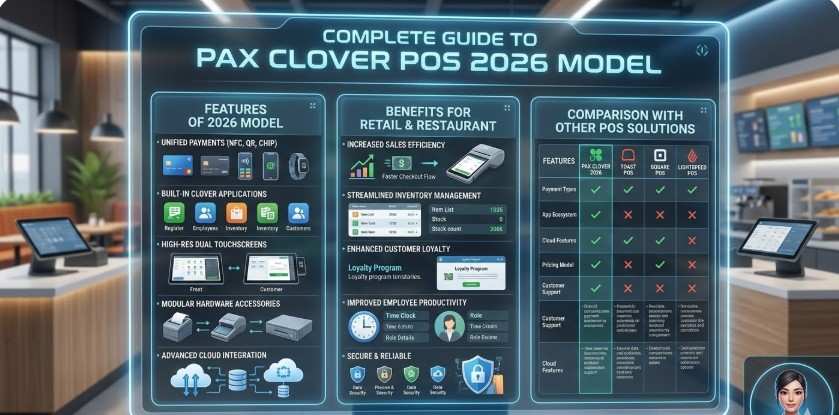
PAX POS machine complete guide 2026: Features, benefits, and comparison with other POS solutions
In today's modern world, businesses rely on cutting-edge technology to streamline payments, optimize operations, and deliver a seamless customer experience. A reliable class PAX POS machine or modern POS device allows businesses to accept secure payments, track transactions, streamline store operations, and also manage sales in just one click.
Today, merchants often deploy two major POS hardware categories within their payment ecosystem: PAX payment terminals and Clover POS systems. Both technologies help businesses manage payments efficiently, but they serve slightly different operational purposes.
This guide helps businesses:
- Learn about PAX and Clover features and specs
- Understand how PAX and Clover work
- Compare PAX and Clover devices with other POS solutions
- Find the pros and cons of the PAX terminal and Clover
- Check PAX and Clover pricing and deals
- Read real user reviews of PAX and Clover
- Discover the best places to buy PAX and Clover online
By understanding these factors helps businesses choose the right payment infrastructure for long-term growth.
Get Started With Us
Fill in your details and we'll get back to you shortly.
Understanding Modern POS Technology
A modern POS device combines hardware, payment software, and business management tools into one system. These systems allow business owners to monitor operations remotely while maintaining secure payment processing and transactions.
Businesses use POS technology to:
- Accept credit cards and digital wallets
- Track product inventory
- Generate sales reports
- Manage employees
- Improve checkout speed
Modern POS systems also support cloud connectivity. This means business owners can access their sales reports, inventory data, and transaction history from anywhere using laptops or smartphones.
Overview of Clover POS Systems
The Clover machine ecosystem provides a complete POS environment designed for retail stores, restaurants, cafés, and service businesses.
Businesses rely on Clover systems to:
- Process transactions quickly
- Track inventory automatically
- Monitor revenue through real-time dashboards.
- Manage employees and order flow.
These capabilities make Clover a practical POS solution for businesses that require both payment processing and operational management.
Many merchants also appreciate Clover because the platform supports third-party business applications. These can allow companies to expand functionality with tools such as marketing automation, loyalty programs, and advanced inventory management.
Clover POS Devices Explained
Clover offers multiple devices designed for different checkout environments.
Clover Flex
The Flex supports mobile checkout and table-side payments. Businesses commonly use this device for: Restaurants and cafes. Delivery services. Retail stores need mobile payment solutions. Its portability improves checkout speed, customer convenience, and experience.
Clover Mini
The Mini functions as a compact countertop POS system. It allows businesses to: Accept card and contactless payments; Print receipts; Manage product catalogs; Track sales activity. Small retail stores and cafés often install this device at checkout counters.
Clover Solo Station
The Solo Station provides a complete POS workstation with a large screen and advanced reporting tools. Businesses use this system for:
- Inventory tracking
- Employee management
- Full checkout operations
- Business analytics
Clover Kiosk
The Kiosk enables self-service ordering for restaurants and quick-service for businesses. Key advantages include: Faster order processing; Reduced customer wait time; Lower operational workload for staff. Self-service kiosks have become popular in modern restaurants and food chains.
Clover Compact
The Compact offers a lightweight payment solution designed for small businesses. It works well for: Small retail stores; Pop-up shops; Service providers needing simple POS setups.
Understanding How PAX and Clover Work?
Businesses often want to know this before selecting a payment solution.
The system works through three core components:
- POS hardware for payment acceptance
- Software dashboards for business management
- Secure payment networks for transaction processing
When a customer completes a purchase, the POS device processes the payment, records the sale, and updates inventory automatically.
Still curious about POS devices and how they work? Take a look at the complete guide on our website.
PAX Payment Terminals
While Clover systems focus on POS management, PAX payment processing emphasizes secure transactions.
These devices support:
- Contactless payments
- Chip and PIN transactions
- Mobile wallet payments
- Secure, encrypted payment processing.
Examples of PAX hardware available in our product ecosystem include:
- A77 Smart Mobile POS
- A8700 Dual-Facing Countertop
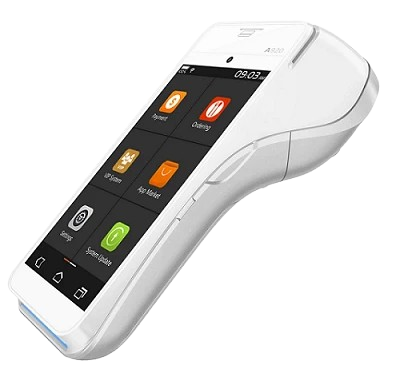
- A920 Elegant Smart Mobile POS
- A920 Pro Powerful Smart Mobile POS
- E700 Smart EPOS
These terminals provide reliable payment processing across retail, hospitality, and service industries.
PAX Vs Clover Vs Other POS Solutions: Feature Comparison
Businesses often compare PAX and Clover to other POS solutions before selecting a system.
| Feature | PAX | Clover | Other POS Solutions |
|---|---|---|---|
| Primary Role | Payment terminal and SmartPOS hardware | Full POS system with software, hardware, and payment processing | Varies by provider, often separate POS software and payment terminals |
| Best Use Case | Businesses needing secure card payment devices | Retail, restaurants, and service businesses need a complete POS setup | Suitable for multiple industries, depending on the POS provider |
| Inventory Management | Limited or provider-dependent; often handled through integrated software | Built-in inventory tools and app-based inventory management | Some systems require third-party integrations for inventory |
| Mobility | Strong handheld and mobile terminal options | Mobile devices like Clover Flex for on-the-go payments | Many POS providers offer mobile or tablet-based POS options |
| Business Insights | Depends on the deployment partner or software integration | Built-in sales reports, analytics, and performance insights | Reporting features vary depending on the POS software |
This comparison helps merchants evaluate operational needs before investing in POS hardware.
Pros and Cons of PAX and Clover
Businesses evaluating POS solutions often want to find the pros and cons of PAX and Clover.
Functionality Analysis of PAX
Advantages
- Secure payments via card transactions.
- Reliable hardware for daily business use.
- Good connectivity with quick Wi‑Fi and mobile networks.
Limitations
- Limited built‑in features
- Basic UI isn't intuitive.
- Fewer apps/integrations when compared to some competitors.
Functionality Analysis of Clover
Advantages
- Includes inventory, reporting, payments, and more.
- Easy-to-use interface for staff and owners.
- Large app marketplace for extra features.
Limitations
- It is more expensive than basic POS hardware.
- Subscription fees to access some features.
- Has limited hardware.
Understanding these factors helps businesses make informed technology decisions.
Real User Reviews of PAX and Clover
Many merchants search online to read real user reviews of PAX and Clover before investing in POS hardware.
PAX POS – User Reviews
Positive Reviews: Secure payment processing; Durable hardware suitable for high-volume transactions; Stable connectivity for card and contactless payments.
Common Concerns: Limited built-in POS features without external software; Basic interface compared to full POS systems.
Clover POS – User Reviews
Positive Reviews: Easy setup and user-friendly interface; Built-in tools for inventory, reporting, and business management; Clear and detailed sales reporting dashboard.
Common Concerns: Monthly subscription or service fees; Higher initial hardware investment.
Overall, most businesses report improved efficiency after adopting modern POS systems.
How Much Do PAX and Clover POS Systems Cost? Pricing Guide
Business owners often compare PAX and Clover POS pricing before purchasing POS hardware. Understanding the cost structure helps merchants choose a system that fits their operational needs and budget.
PAX POS Pricing
PAX pricing depends mainly on the terminal model, payment processor, and POS software integration. Businesses usually buy PAX terminals through authorized resellers or payment service providers. They always tend to go for providers and suppliers who offer them multiple features—for example, the hardware and payment processing features.
Clover POS Pricing
Clover pricing typically includes the POS device cost, monthly software subscription plans, payment processing fees, and optional accessories. Merchants often compare packages from certified Clover providers to select the most suitable plan.
By comparing both options carefully, businesses can choose a POS solution that delivers reliable payment processing, clear pricing, and long-term operational value.
Real Business Use Cases
A retail electronics store upgraded its checkout system using both Clover POS systems and PAX payment terminals.
The business installed Clover and PAX devices, such as: Clover Solo Station for main checkout management; Clover Flex for mobile transactions; A920 Pro Powerful Smart Mobile POS for flexible in-store payments.
After six months, the store report looks like this: 30% faster checkout time; Improved customer satisfaction; Automated daily revenue reporting.
This example demonstrates the operational value of modern POS infrastructure.
Health and Security Components
Businesses must also understand the health and safety benefits of using PAX devices and Clover POS systems.
How PAX Supports Safer Transactions?
PAX devices help support safer in-person payments with features such as: Contactless payment options; Encrypted transaction processing; PCI security support; Reduced cash handling.
How Clover Improves Payment Security?
Clover systems offer health and security benefits that support safer daily transactions, including: Contactless and tap-to-pay payments; Built-in security protections; Fraud prevention tools; Secure customer payment processing.
These features protect both businesses and customers during digital transactions.
Best Peripherals for POS Systems
Businesses often find the best accessories for PAX devices to improve checkout efficiency.
Common POS accessories include: Receipt printers; Barcode scanners; Cash drawers; Customer display screens; Device stands.
These accessories help businesses create a professional checkout environment.
PAX and Clover Device Troubleshooting: Common Issues and Quick Fixes
PAX Troubleshooting: PAX devices may face SIM or Wi-Fi connection errors, frozen screens, battery charging problems, or app login failures. These issues can often be fixed by restarting the device, reinserting the SIM card, checking network settings, charging with the correct adapter, or clearing and reopening the payment app.
Clover Troubleshooting: Clover devices commonly run into receipt printer pairing issues, card reader errors, dashboard sync delays, or app loading problems. Most can be resolved by reconnecting accessories, checking Bluetooth or Wi-Fi, refreshing the system, or updating Clover software.
Tips for First-Time POS Users
Businesses can maximize the performance of their POS infrastructure by following several operational best practices, especially when they refer to guides for first-time Clover users to understand the system more effectively.
- Optimize Product Catalogs: Organizing products into categories makes checkout faster and easier for employees.
- Monitor Sales Analytics Regularly: Daily and weekly reports help business owners identify trends and make better decisions.
- Train Employees on Device Usage: Proper staff training reduces operational errors and improves checkout speed.
- Maintain Device Security: Using strong passwords and software updates protects business data.
These small operational improvements significantly increase the overall efficiency of POS systems. So, we recommend that businesses understand the main difference between the PAX and Clover 2026 model and older versions before upgrading their POS systems.
What Warranty and Customer Support Should You Look for in POS Systems?
Businesses should evaluate warranty coverage and customer support options before investing in POS technology.
Reliable POS suppliers typically provide:
- Hardware Warranty Coverage: It gives protection from manufacturing defects and hardware failures for a specific period.
- Technical Support Services: It can provide access to experts who help resolve setup issues, system errors, or payment processing problems.
- Software Updates: It ensures the POS system receives security patches, new features, and performance improvements.
- Device Replacement Options: It allows businesses to quickly replace faulty POS hardware to avoid disruptions in daily operations.
Strong customer support becomes extremely important if a device experiences technical issues during business hours. Merchants should always verify warranty policies before purchasing POS hardware.
Long-Term Performance and Reliability
Businesses also want to understand the long-term performance and durability of PAX systems. When maintained properly, these POS devices operate reliably for years. Software updates improve security and ensure compatibility with new payment technologies. This reliability makes modern POS systems a critical investment for growing businesses.
Future Trends in POS Technology
POS technology continues to evolve as businesses adopt smarter digital solutions.
Several trends will shape the future of POS systems:
- AI-Powered Analytics: Artificial intelligence will help businesses analyze sales data and predict customer behavior.
- Cloud-Based POS Systems: Cloud dashboards allow merchants to manage stores remotely from smartphones or laptops.
- Omnichannel Retail Integration: POS systems will connect physical stores to online stores, enabling seamless shopping experiences.
- Biometric Authentication: Future POS systems may integrate fingerprint or facial authentication for enhanced security.
Businesses that adopt modern POS technology early will gain significant competitive advantages.
Conclusion
POS technology plays a central role in modern retail and service operations. Businesses rely on reliable payment infrastructure to process transactions quickly and manage operations efficiently.
Systems like Clover POS devices provide complete business management tools, while PAX payment terminals deliver secure and flexible payment processing.
By evaluating both solutions carefully, businesses can build a payment ecosystem that supports long-term efficiency, customer satisfaction, and sustainable growth. Explore PAX and Clover POS solutions today to find the best fit for your business.